No one knows the clock started
Practice management systems track visits and billing. They have no field for the date of the accident - which is the date every legal deadline is calculated from.
CaseFlow keeps your whole team watching it.
Real-time SOL countdowns, stage pipeline, and case visibility built for personal-injury chiropractic practices. Upload a ChiroTouch CSV and you're live in minutes.
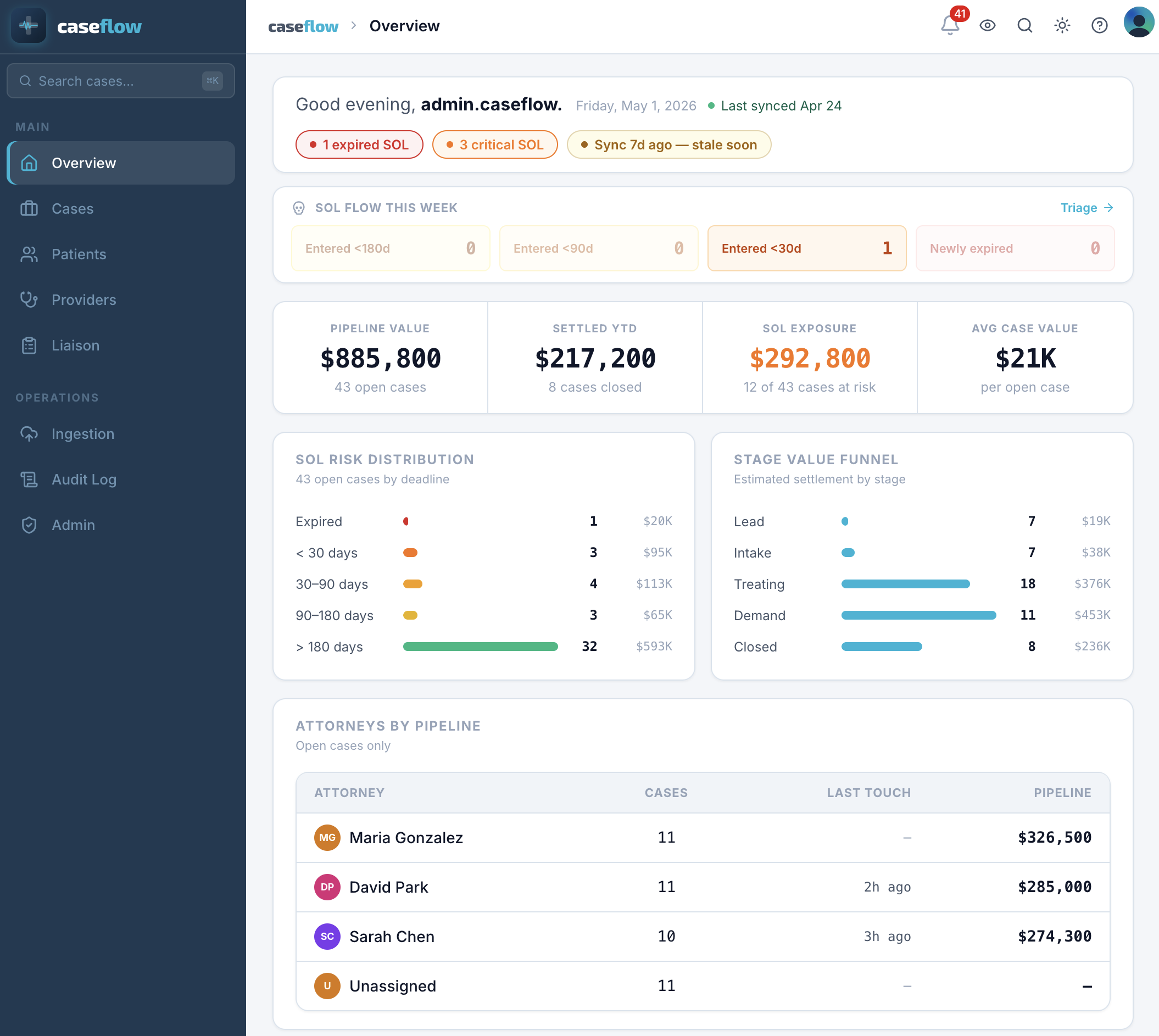
Your practice management software handles scheduling, notes, and billing well. It was built for clinical workflows - not for tracking a personal-injury case from intake through settlement. Office managers fill the gap with spreadsheets, sticky notes, and memory.
Practice management systems track visits and billing. They have no field for the date of the accident - which is the date every legal deadline is calculated from.
No countdown, no escalation, no alert. Cases pass their legal filing window without anyone noticing until it is too late to do anything about it.
Total billed minus payments minus write-downs - calculated on a notepad or in a spreadsheet. The balance quoted to an attorney is rarely the real number today.
California protocols require re-evaluation at 30 days or 12 visits, whichever comes first. Two clocks, both tracked manually, both easy to miss.
Drop a CSV export from ChiroTouch. Takes two minutes. No IT involvement.
Every case, every SOL countdown, every stage. Visible immediately.
Manager, provider, front desk, attorney liaison. One source of truth.
Pick your role to see what CaseFlow looks like from your seat.
When something slips, it comes back to you.
Every open case ranked by urgency. The ones approaching their legal window are flagged before your morning coffee. No digging, no spreadsheet - it's the first thing you see.
Color-coded. Updated overnight. Nothing manual.
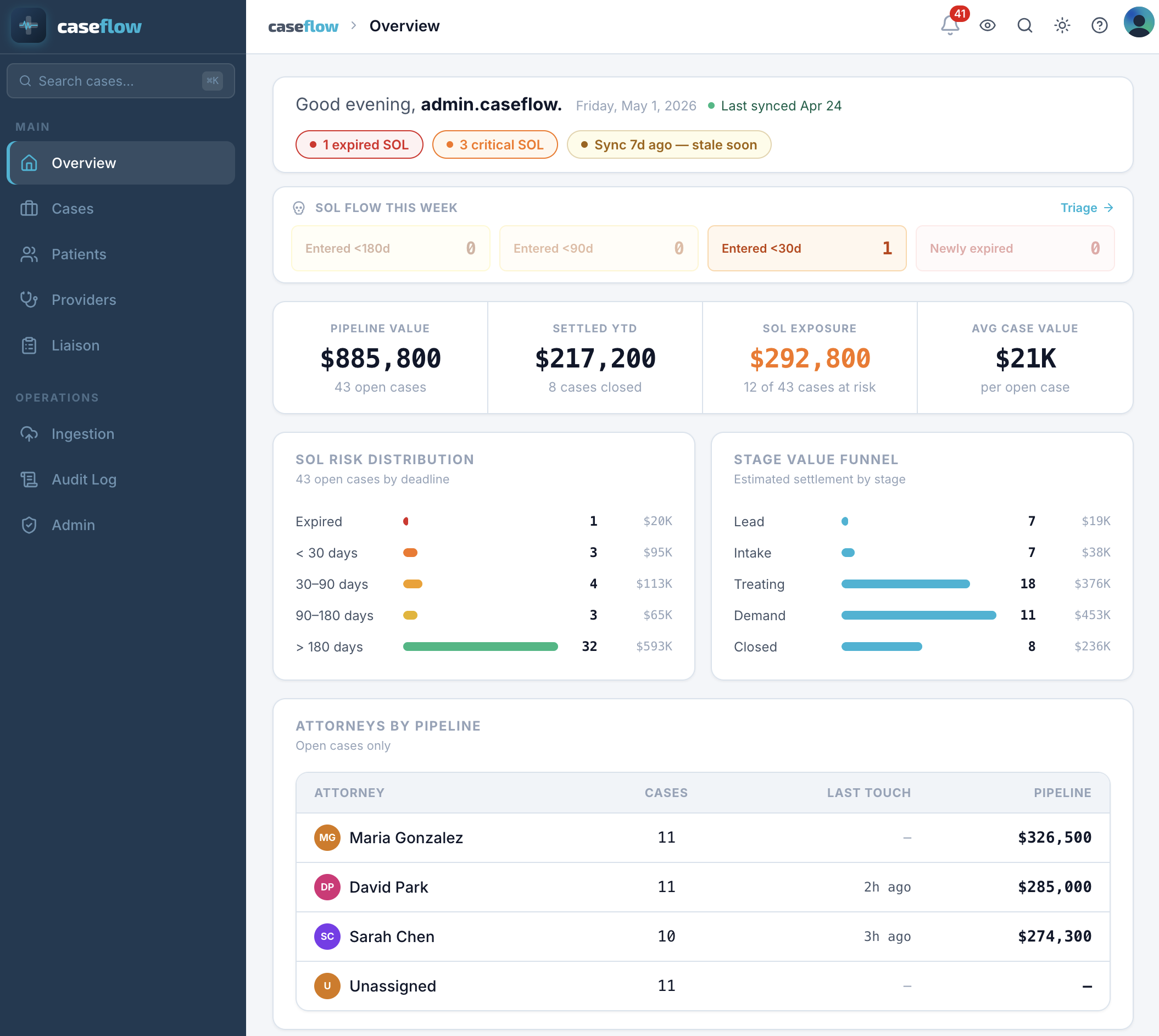
How many cases are in treatment, how many are in demand, what the open settlement value looks like. Real numbers, not estimates reconstructed from memory.
Snapshot view. No reports to run.
Demand sent, offer received, accepted, funded, lien resolved - each step is a milestone, not a note in someone's email.
If an attorney asks for a status update, the answer is already there.
We were running 40-plus open PI cases on a spreadsheet. The statute of limitations dates were in a column nobody was checking consistently. CaseFlow put the countdown on every case, in front of everyone. We caught three critical windows in the first month that would have been missed.
Built on Cloudflare and Neon. Both HIPAA-eligible platforms with BAAs in place before any real patient data enters.
AES-256 at rest - TLS 1.3 in transit - US West data residency
Patient data in a PI practice is sensitive. Names, dates of accident, treatment history, lien details - all of it falls under federal privacy rules. CaseFlow was built from day one with that in mind. Patient records are encrypted, access is controlled by role, and every action on every record is permanently logged. If you ever need to show an auditor what happened and when, the answer is there.
We'll walk you through a live look at the dashboard using a practice just like yours. 20 minutes. No obligation.

AI Engineer
Lead AI Engineer
Joining the team soon.